


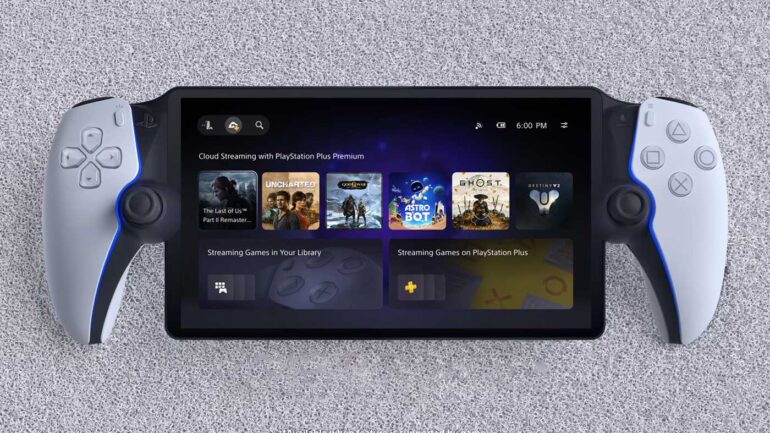

PlayStation Portal’s Cloud Streaming functionally has officially launched out of beta today bringing with it a bunch of new features.
The new update will bring 3D Audio Support whilst using remote play and cloud streaming, it will bring the ability to passcode lock your PlayStation Portal and a new Network Status Screen to quickly check your connection quality.
This new update will allow the PlayStation Portal to cloud stream games from the PlayStation Plus Game/Classics Catalogue as well as over 2,000 games from your own library of purchased games.
There’s now a re-designed home screen as well that has multiple tabs including Remote Play, Cloud Streaming and Search, as well as an in-game store, game invitations nad new accessibility options as well.
Unfortunately, there’s still no word about PlayStation cloud streaming coming to Australia, but now that you can stream your own library, we do seem more hopeful.
NEW PLAYSTATION PORTAL FEATURES
- 3D Audio Support: 3D Audio is now available during Remote Play and Cloud Streaming on supported games, when using a compatible audio device. Immerse yourself in spatial sound with wired headphones or a compatible PlayStation Link wireless audio device such as the Pulse Explore wireless earbuds and Pulse Elite wireless headset.
- Passcode Lock: Protect your device by setting a passcode on your PS Portal.
- To set a passcode, go to Settings > System > Passcode.
- Network Status Screen: A stable internet connection is essential to ensure the best experience on PS Portal. You can now quickly check your connection quality with an easy-to-access status view.
-
- During Cloud Streaming or Remote Play, open the Quick menu and go to Troubleshoot > Show Network Status.
-
NEW PLAYSTATION PORTAL UI (NOT AVAILABLE IN AUS)
- Remote Play home screen: Connect to a PS5 console paired with the PS Portal to enjoy games installed on that console. A PlayStation Plus membership is not required for Remote Play.
- Cloud Streaming home screen: A new dedicated home screen for Cloud Streaming allows PlayStation Plus Premium members to instantly stream a range of compatible PS5 games without waiting for downloads.
- Search screen: Quickly look up any game that supports Cloud Streaming. If you don’t have the entitlement to stream a game, a QR code will be displayed to direct you to the PlayStation App or to a web browser on another device.