


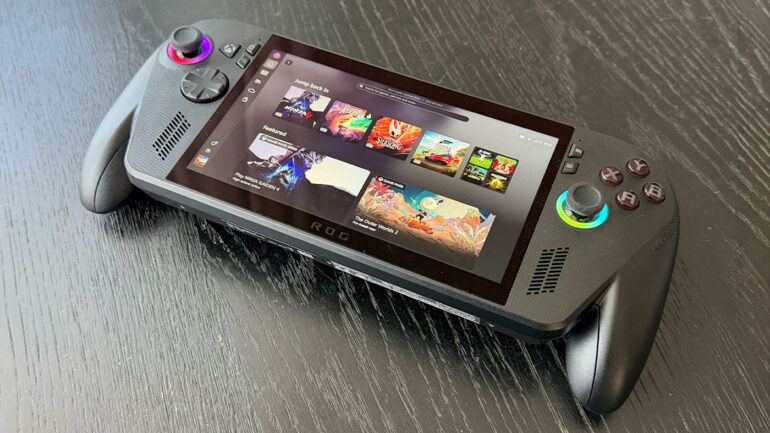

After launching last year in partnership with ASUS and AMD, the ROG Xbox Ally X has seen several updates tailored around improving the player experience.
The ROG Xbox Ally X is the latest in the ASUS ROG line of handhelds, combining the power of the Xbox ecosystem and software catalogue with Windows 11.
The latest update revolves around delivering an improved experience when the handheld is in docked mode, whether to an external TV or monitor. Here’s a rundown of what’s new to the ROG Xbox Ally X:
Docking Improvements
- Docked play now defaults to TV display
- Much like the Nintendo Switch console family does, the gameplay now seamlessly shifts to the TV display while automatically powering off the handheld’s display.
- Automatic enhancements on smart TVs
- When you dock your ROG Xbox Ally or Xbox Ally X, some modern smart TV models, including Samsung and LG, will automatically enable built-in features catered to improving the gaming experience, like Samsung’s Auto Game Mode, or ALLM (auto low latency mode).
- Display Widget for Game Bar
- You’re now able to adjust display settings quickly from the Game Bar. This is channelled through a new Display Widget, which streamlines display options like resolution, refresh rate, and projection mode without the need to leave the game or sift through Windows settings. Better yet, it only shows options that are compatible with your TV.
- Improved controller pairing for docket play
- When pairing an Xbox or Designed for Xbox controller, the docked Xbox Ally’s controls are automatically disabled, and the paired controller is put in total control. This is said to streamline the experience and unlock docked play for a wider range of games. For the smoothest experience, it’s recommended that you pair the controller before docking.
- Gamepad Cursor
- Gamepad Cursor has been implemented to assist with navigation experiences, like web browsers or third-party gaming storefronts, that don’t support conventional forms of controller input. This feature is rolling out to all Windows 11 PCs via a Game Bar update.
Auto Super Resolution (Auto SR) is in Preview for Xbox Insiders
Starting today, Automatic Super Resolution, which had been introduced to make games look sharper and play smoother, is available in preview for Xbox Insiders using the ROG Xbox Ally X.
The tug of war between resolution and framerate, with any luck, should no longer be a struggle for players. When docked and connected to an external display, Auto SR delivers upscaled, 1440p detail alongside smoother framerates on larger screens. To make testing it seamless, the feature has also been integrated into Game Bar, giving players total control over when it’s applied in games.
Click here for a deeper dive into the feature.
Super Wideband Stereo Voice
Back in December, Xbox released an update for the Xbox Wireless Headset that implemented support for Bluetooth LE Audio, which lets players benefit from lower latency and improved battery life.
Now, Bluetooth LE Audio, which is available on the Xbox Ally handhelds, streams in super wideband stereo voice fidelity, which operates at a significantly higher sample rate than traditional narrowband or wideband frequencies.
This feature is available when connected to headsets, earbuds, and even hearing aids that support Bluetooth LE Audio.
Enhanced Vibration
No hidden delights with this, it is what it says on the box. This feature offers a fuller haptic experience that matches “what you expect across Xbox devices.”
Bringing PC storefronts together into one library
As of this month, you’ll be able to add, remove, edit, or even launch any installed game or app directly from the Xbox experience. This includes games from other PC storefronts and launchers.
Once added to the library, the games can even be personalised to the point where names, images, launch targets, and command-line options can be edited.
Default Game Profiles and Advanced Shader Delivery
In a continued effort to ensure that over 1000 PC games will play great on handheld, which saw Xbox introduce Default Game Profiles, which made it easier to run games at optional settings when unplugged, last year, Advanced Shader Delivery will let supported games download precompiled shaders so that they’re able to launch faster and run smoother from the first time played.
Both features are available on ROG Xbox Ally and ROG Xbox Ally X, and are supported by several popular games already, with plans to add support to upcoming games, such as Forza Horizon 6.